

Available for Mac

Free DICOM viewer for Mac — native, fast, and built for real reading.

Download DN Viewer — a free DICOM viewer and DICOM reader for Mac — to open studies, connect to DICOM servers, use near-instant MPR, 3D rendering, and AI-powered segmentation and volume calculation tools, and keep reporting inside one fast native macOS workspace.

Built for MRI-heavy workflows on Mac: your pane layouts come back exactly as you left them for each study, so you spend time reading, not rearranging.

Native macOS app Runs natively on Mac — no browser, no Electron overhead.
Near-instant MPR Move through multiplanar views with minimal waiting.
DICOM server access Connect to remote studies directly from the Mac desktop app.
3D render Bring volumetric review into the same Mac reading workflow.
MRI layout memory Your protocol view reopens the moment you load a study on Mac.
AI segmentation Use AI-powered segmentation and volume calculation tools for quicker region isolation on Mac. Read the guide →
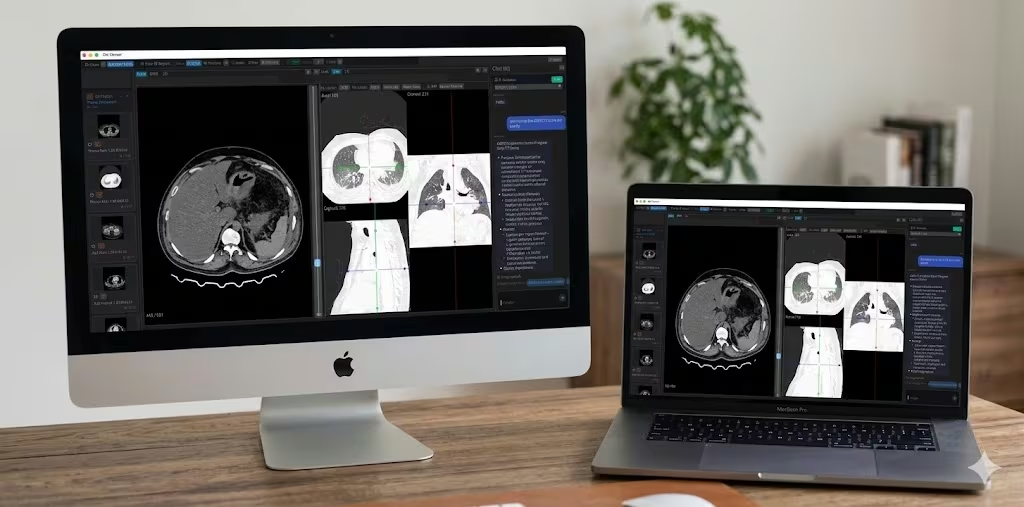
DN Viewer running on MacBook and iMac
Overview

Built for faster DICOM review on Mac.

DN Viewer for Mac focuses on native speed, direct DICOM server access, near-instant MPR, 3D rendering, AI-powered segmentation and volume calculation tools, and reporting tools that stay inside the app — no browser tab juggling.

Why DN Viewer for Mac

A native Mac workflow built for speed and focus.

This is not a browser-based viewer. DN Viewer is a native macOS app designed for fast image review and direct access to the studies you need.

MRI advantage on Mac: save your reading layout once and it comes back automatically for each new study. No manual rearranging, no loading screens — your protocol is just there.

Platform

  • Native macOS app — no browser, no Electron overhead.
  • Free download — no subscription required for core DICOM viewing and reading.
  • Requires macOS 12 Monterey or later (formerly Mac OS X). Optimised for Apple Silicon.

Connectivity & Access

  • Direct DICOM server access from the Mac desktop.
  • DICOMweb support for modern web-based imaging workflows.
  • Download studies from the internet with custom teleradiology support.
  • Open local DICOM files directly from USB, CD/DVD, or any folder.

Visualization & Review

  • Near-instant MPR for faster spatial review on Mac.
  • 3D render inside the same Mac reading workflow.
  • MRI layouts reopen automatically for each study — no rearranging needed.

AI & Reporting

  • AI-powered segmentation and volume calculation tools for faster region selection.
  • AI-assisted reporting with speech-to-text, AI-enabled drafting, and validation checks — significantly cutting down report drafting time.
  • Chat and AI features without leaving the Mac viewer.

How DN Viewer compares on Mac

If you've been using OsiriX, Horos, or a browser-based viewer, here's how DN Viewer fits in.

  • vs OsiriX Lite: OsiriX Lite is capped at 2D viewing and is no longer actively developed for modern macOS. DN Viewer adds MPR, 3D rendering, DICOM server connectivity, and AI tools — and runs natively on Apple Silicon.
  • vs Horos: Horos is open-source and feature-rich, but setup is complex and updates are infrequent. DN Viewer is actively maintained, installs in minutes from the Mac App Store, and includes built-in AI-assisted reporting.
  • vs browser-based viewers: Web DICOM viewers depend on your internet connection and browser performance. DN Viewer runs natively, so MPR and 3D rendering use the GPU directly — no browser overhead, no tab to lose track of.
DN Viewer DICOM server and PACS connection on Mac DICOM Server & PACS Access
DN Viewer near-instant MPR on Mac Near-Instant MPR
DN Viewer MRI layout memory on Mac MRI Layout Memory
DN Viewer chat and AI features on Mac Chat & AI Features
Getting Started

Download and install in three steps.

Getting started on Mac is simple. Install from the App Store, or use the direct site download if you prefer a manual .dmg install.

1

Open the Mac App Store

Use the main App Store button to install DN Viewer from Apple’s store listing. If needed, the Apple Silicon .dmg is still available from our site as a direct download.

2

Install DN Viewer

App Store installs land in Applications automatically. If you choose the direct .dmg instead, open it and drag DN Viewer into Applications just like any native macOS app.

3

Open files or connect to PACS

Open local DICOM files directly, or configure your DICOM server connection to query and retrieve studies from your PACS on Mac.

Mac Download

Download DN Viewer for Mac.

macOS

DN Viewer runs as a native Mac app, so near-instant MPR, 3D rendering, AI-powered segmentation and volume calculation tools, study navigation, and AI-assisted reporting stay fast and responsive in a true macOS desktop workflow.

  • Native macOS app — free download, no subscription needed for core features.
  • Free DICOM viewer and reader — no registration required to open local files or connect to PACS.
  • Supports Apple Silicon (M1/M2/M3/M4); Intel Mac build coming soon.

By downloading and using DN Viewer you agree to the End User License Agreement.

FAQ

Questions about DN Viewer for Mac.

Is DN Viewer free — or is it paid software?

DN Viewer is free to download for Mac. Core DICOM viewing, DICOM server access, MPR, 3D rendering, and local file reading are all included at no cost — no registration required. It is a free native macOS DICOM viewer, not a time-limited trial.

What does DN Viewer for Mac include?

DN Viewer for Mac includes core DICOM viewing, MPR, 3D rendering, DICOM server access, AI-powered segmentation and volume calculation tools, and AI-assisted reporting in one native macOS app.

Which Mac models does DN Viewer support?

The current release runs natively on Apple Silicon Macs - M1, M2, M3, and M4 chips. An Intel Mac build is in active development and will be available soon.

What macOS version is required?

DN Viewer requires macOS 12 Monterey or later. On Apple Silicon Macs it runs fully natively.

Can I connect to a DICOM server or PACS from the Mac app?

Yes. DN Viewer includes built-in DICOM server connectivity (C-FIND / C-MOVE) so you can query and retrieve studies directly from your PACS or worklist without leaving the Mac app or opening a browser.

How is DN Viewer different from a web-based DICOM viewer?

DN Viewer is a native macOS application, not a browser-based viewer. That means faster image loading, no internet dependency for local files, no browser rendering overhead, and native macOS keyboard shortcuts and window management. MPR and 3D rendering run against the GPU directly.

Is there a Windows version of DN Viewer?

Yes. DN Viewer is also available for Windows. The same core workflow — DICOM server access, MPR, 3D rendering, AI-powered segmentation and volume calculation tools, and AI-assisted reporting — is available on Windows.

How does DN Viewer compare to OsiriX on Mac?

OsiriX Lite is free but limited to 2D viewing and is no longer actively maintained for modern macOS. DN Viewer adds near-instant MPR, 3D rendering, direct DICOM server access, and AI-powered segmentation tools, and runs natively on Apple Silicon (M1/M2/M3/M4) — without the limitations of the free OsiriX tier.

How does DN Viewer compare to Horos on Mac?

Horos is open-source and capable, but requires more setup and receives infrequent updates. DN Viewer is actively developed, installs in minutes from the Mac App Store, and includes AI-assisted reporting and built-in DICOM server connectivity out of the box — with no manual plugin configuration needed.

What are the system requirements for DN Viewer on Mac?

DN Viewer requires macOS 12 Monterey or later. The current release is optimised for Apple Silicon (M1, M2, M3, M4) and runs fully natively — no Rosetta required. An Intel Mac build is in development. At least 4 GB of RAM is recommended; 8 GB or more is ideal for large CT or MRI series with 3D rendering.

Mac + Windows

Need the Windows version instead?

DN Viewer is also available for Windows. The same fast DICOM workflow, native app experience, AI-powered segmentation and volume calculation tools, and AI-assisted reporting - on Windows.

  • Same fast DICOM workflow on Windows — native app, no browser required.