
How to measure a Cobb angle in DN Viewer.
Use DN Viewer’s Cobb Angle measurement tool to place two endplate lines and display the angle on a spine image. This visual guide covers the software workflow from image selection to result review.
For qualified clinicians: This is a software-use guide, not medical advice. Confirm the study, projection or reconstruction, anatomical landmarks, and result in the clinical context before documentation or management decisions.
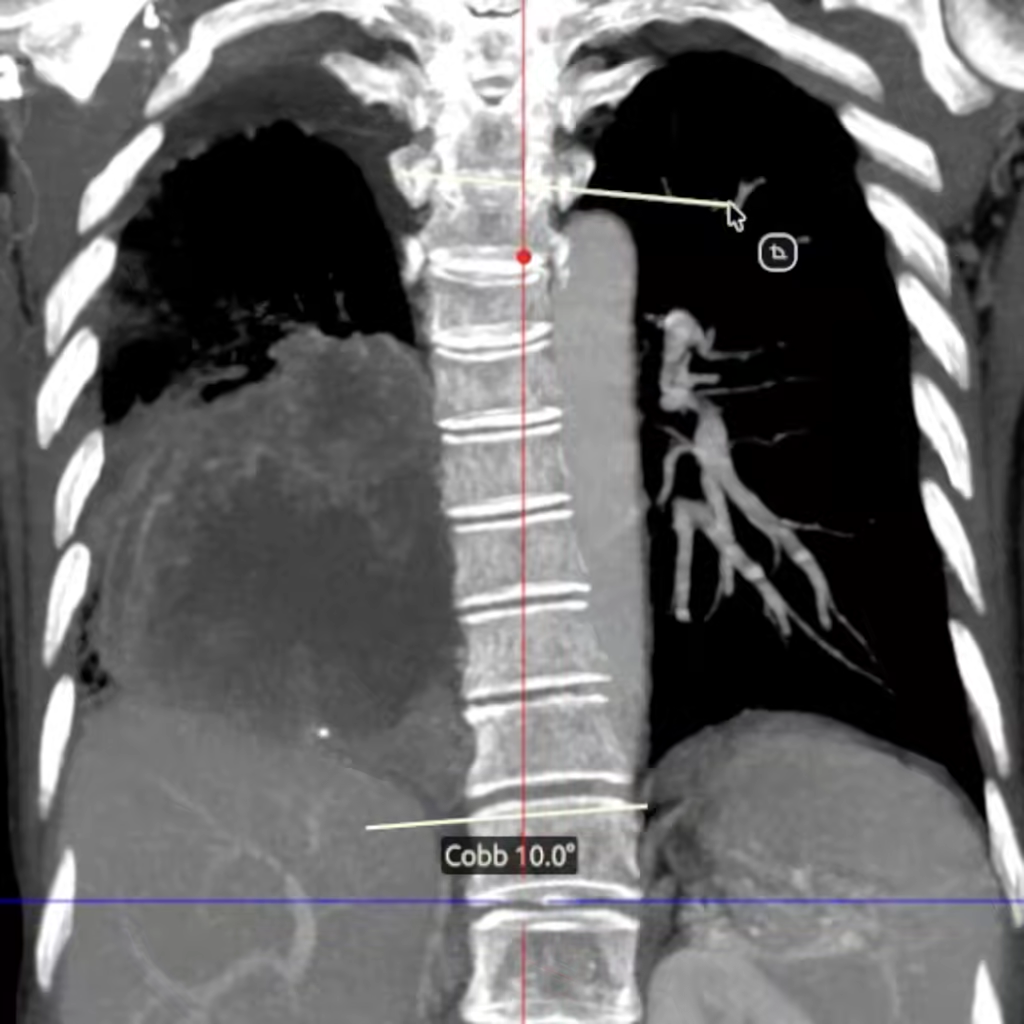
What the Cobb angle tool measures.
The Cobb angle describes the angular relationship between selected vertebral endplate reference lines. In the standard scoliosis measurement method, the upper end vertebra is the most tilted vertebra at the top of the curve and the lower end vertebra is the most tilted vertebra at the bottom of the curve. A line is placed along the superior endplate of the upper end vertebra and another along the inferior endplate of the lower end vertebra.
The angle between these lines—or equivalently, between their perpendiculars—is the Cobb angle. Use consistent landmarks and comparable imaging when following a curve over time. For background on the standard method, see the Scoliosis Research Society glossary.
Measure a Cobb angle: step by step.
Open the appropriate spine image or reconstruction.
Load the study in DN Viewer. Choose the series and plane where the relevant curve and endplates are best visualized. For a longitudinal comparison, use the acquisition and positioning conventions required by your local protocol.
Select Cobb Angle from Measure.
In the DN Viewer toolbar, open Measure and choose Cobb Angle. The tool is ready for the two reference-line placements.
Place the upper endplate line.
Identify the upper end vertebra selected for the curve. Place the first reference line along its superior endplate.
Place the lower endplate line.
Identify the lower end vertebra selected for the same curve. Place the second reference line along its inferior endplate.
Review the displayed angle and landmarks.
DN Viewer displays the Cobb angle after the second line is placed. Before reporting or saving it, verify the selected end vertebrae, endplate alignment, and plane. Repeat or adjust the measurement where your workflow calls for it.

Select the tool before placing points.
The screenshot shows the DN Viewer measurement menu. Selecting Cobb Angle switches the active measurement mode from a general length or angle measurement to the dedicated two-line Cobb workflow.
Start with a clear view of the relevant anatomy.
Use the series and plane appropriate to the clinical question. Make sure the intended vertebral endplates are visible before drawing, rather than relying on a partially obscured or poorly aligned image.

Tips for a consistent measurement workflow.
| Check | Why it matters |
|---|---|
| 1 | Confirm the image plane. A Cobb angle is dependent on the selected image and landmarks; ensure the plane suits the measurement you intend to report. |
| 2 | Use the correct end vertebrae. Identify the upper and lower end vertebrae for the same curve before placing either line. |
| 3 | Align with the intended endplates. Place each line on the selected endplate reference, rather than a nearby disc space or adjacent vertebra. |
| 4 | Keep comparisons consistent. When comparing studies, follow the same institutional measurement method and document the series or view when required. |
Cobb angle measurement questions.
Where is Cobb Angle in the DN Viewer toolbar?
Open Measure in the toolbar and select Cobb Angle.
What are the two lines used for the standard Cobb method?
Place one line along the superior endplate of the upper end vertebra and another along the inferior endplate of the lower end vertebra. The angle between these lines, or their perpendiculars, is the Cobb angle.
Can I use the screenshot result as a diagnostic threshold?
No. The screenshot illustrates use of the software tool only. It is not patient-specific advice and does not establish a diagnostic threshold or treatment recommendation.
Can DN Viewer calculate a Cobb angle from any image automatically?
This guide describes manual placement using the Cobb Angle tool. Review the image and place the reference lines using the landmarks appropriate to your measurement protocol.
Measure within your DICOM reading workflow.
DN Viewer provides desktop DICOM viewing, MPR, 3D tools, and measurement tools for Mac and Windows.